Stations send each menu item to one place. Sometimes you want more than that: for example, a copy of every pizza on the pizza oven’s printer, or every dessert on the pass, whichever menu it was ordered from. In ORDR Staff this is done with tags on your items and a printing rule that ORDR sets up for you.
You add and change the tags yourself. The rule that says “print items with these tags on this printer” is set up by ORDR’s support team, because it is not yet something you can change in ORDR Staff.
Add tags to an item
- In the left-hand menu, choose Menu builder, then the Items tab.
- Press View next to the item.
- Press Edit item.
- In Tags, type one or more tags, separated by commas. For example:
pizza, oven. - Press Save Item.
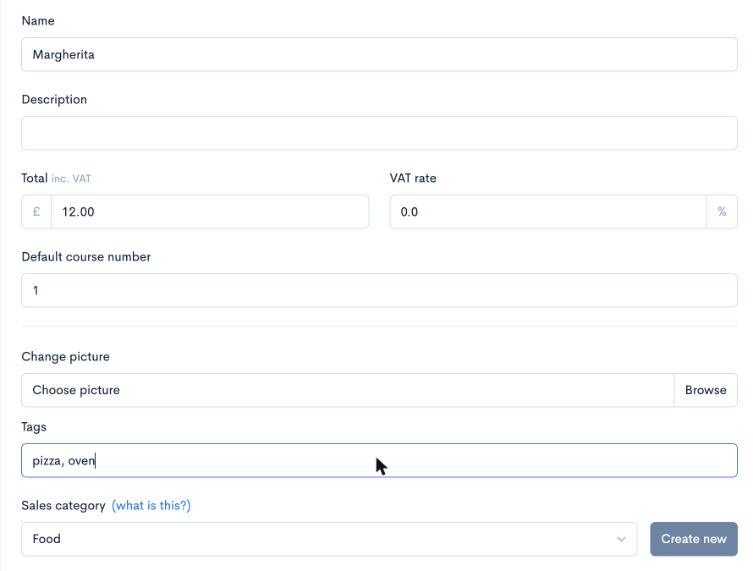
Tags are saved in lower case, so Pizza and pizza are the same tag. Spaces before and after each tag are removed.
To tag many items at once, press Edit all on the Items tab. Each item has its own Tags box there, and changes save as you type.
Check your tags
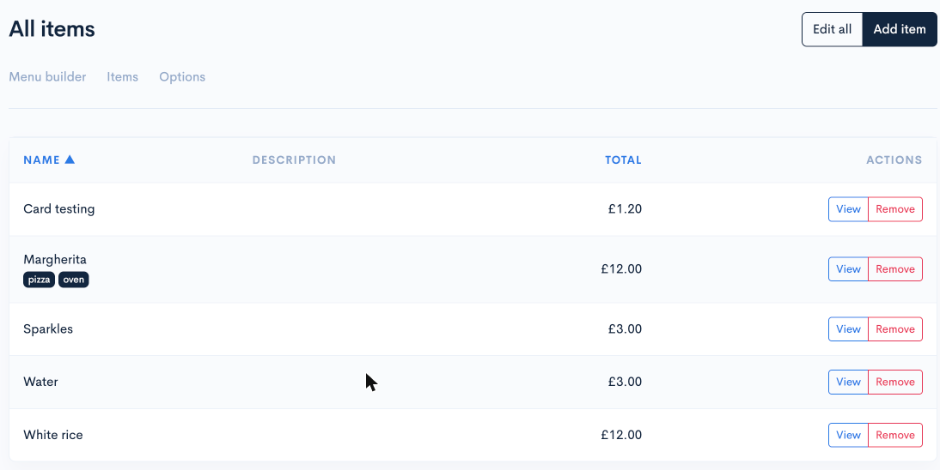
The Items tab shows each item’s tags under its name, so you can see at a glance which items are tagged and which are not.
Ask ORDR to set up the printing rule
Email help@ordr.menu with:
- The printer you want the items on. Name its station as it appears on the Stations page (under Restaurant settings), or give its MAC address.
- The tags to print, exactly as you typed them.
- Which orders it applies to: eat-in, takeaway, delivery, or all of them.
- When it should print, for example as soon as an order is placed. ORDR can also add a button to the bill instead, so staff print it only when they need it.
- For eat-in orders, whether it applies to every table or only some of them.
Once the rule is in place, every new order with a tagged item prints those items on that printer. Other items on the same order are left off that ticket, apart from any item staff typed in by hand rather than picking from the menu, which always prints. An order with none of the tagged items prints nothing on that printer. This is as well as the normal station tickets, which keep printing as before.
Keep tags and rules matching
The rule looks for the exact tag. If you rename a tag on your items, for example from dessert to desserts, those items stop printing on the rule’s printer until either the items or the rule match again. When you add a new item that should print there, remember to give it the tag.
If you want to change a rule, or stop it, email help@ordr.menu.